
Some links are affiliate links. Each review says whether I used the tool myself. Full disclosure
In this article (12)
- Introduction
- TL;DR BOX
- What Is Hostinger Horizons?
- What Was My Hostinger Horizons Build Experience?
- What Kind of Sites Does Hostinger Horizons Generate?
- How Much Does Hostinger Horizons Cost?
- What Works Well in Hostinger Horizons?
- What Are Hostinger Horizons’ Drawbacks?
- How Does Hostinger Horizons Compare to WordPress, Webflow, and Framer?
- How Do I Use Hostinger Horizons?
- Is Hostinger Horizons Worth It in 2026?
- Frequently Asked Questions
Introduction
Building a custom, high performance website used to require deep knowledge of React, Tailwind CSS, and complex build tools. For creators and entrepreneurs, this meant either spending months learning to code or thousands of dollars hiring a developer. You were stuck between rigid templates on WordPress or expensive custom development. Hostinger Horizons changes this entirely. It is an AI powered web application builder that generates real, production ready React code based on your natural language prompts.

I built an early version of WrayWest Blog from scratch using Hostinger Horizons before later migrating the production site to WordPress. I did not write the underlying React components manually. Instead, I guided the AI through an iterative process to construct the exact platform I envisioned. But this leads to a critical question. Can an AI website builder really produce professional, production ready code that you can actually rely on for a real business?
TL;DR BOX
- Best for: Creators wanting professional websites without coding.
- Tech stack: React + Vite + Tailwind + shadcn/ui.
- Pricing: $6.99/mo with hosting plan.
- Output: Real React code you can export and edit.
- Output: Real React you can export, then later migrate elsewhere (I moved to WordPress).
- Verdict: 8.2/10. Best AI website builder for React-level quality.
What Is Hostinger Horizons?
Hostinger Horizons is an advanced AI powered web application builder that generates real React code instead of relying on rigid WordPress templates or visual drag and drop abstractions. It utilizes a modern technology stack including React, Vite for lightning fast builds, Tailwind CSS for styling, and shadcn/ui for accessible, beautiful components.
It also includes built in hosting, PocketBase database integration, and Express.js API server capabilities for handling complex backend logic. I built an early version of WrayWest Blog on this stack before later migrating the production site to WordPress, guiding the AI rather than writing the code manually.
What Was My Hostinger Horizons Build Experience?
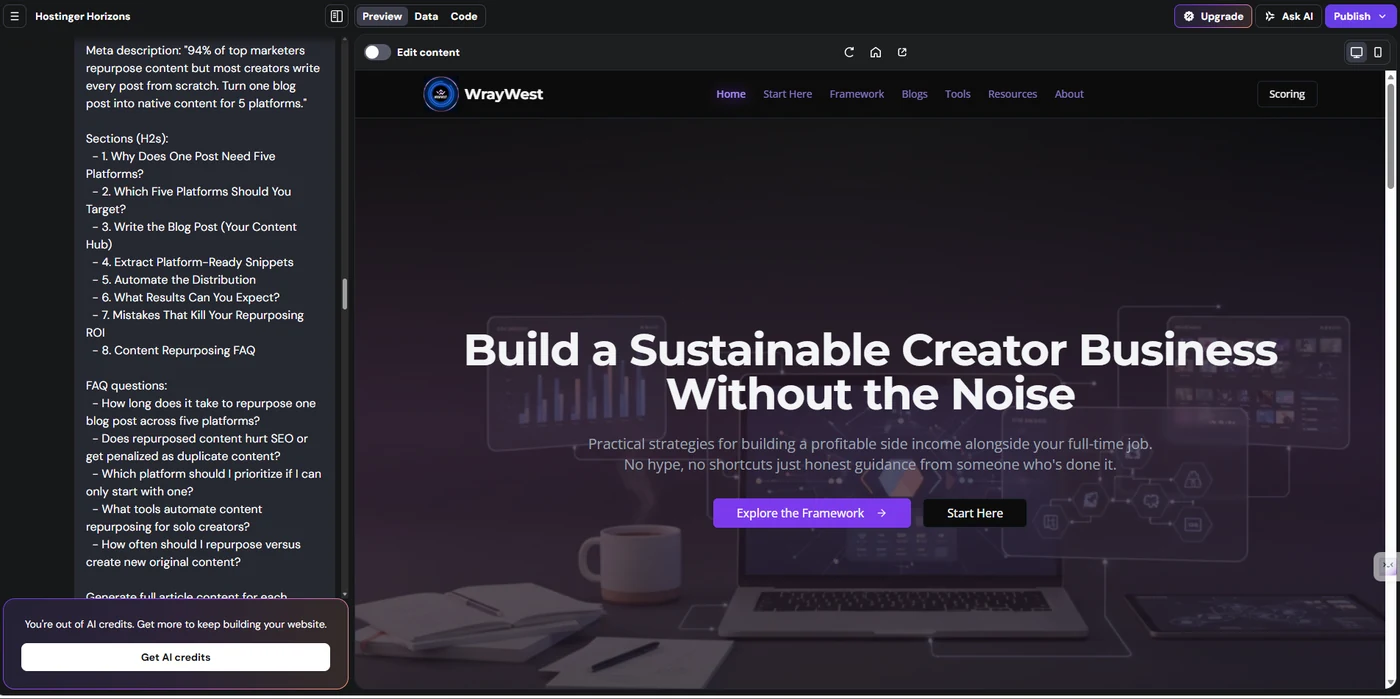
Building the original version of WrayWest Blog from scratch on Horizons was a revelation in iterative development. I started with a blank canvas and used conversational prompts to construct a complex, dark themed platform with custom branding. The project required sophisticated features, including a comprehensive blog system, a dynamic tools directory, and a custom scoring framework for reviews.
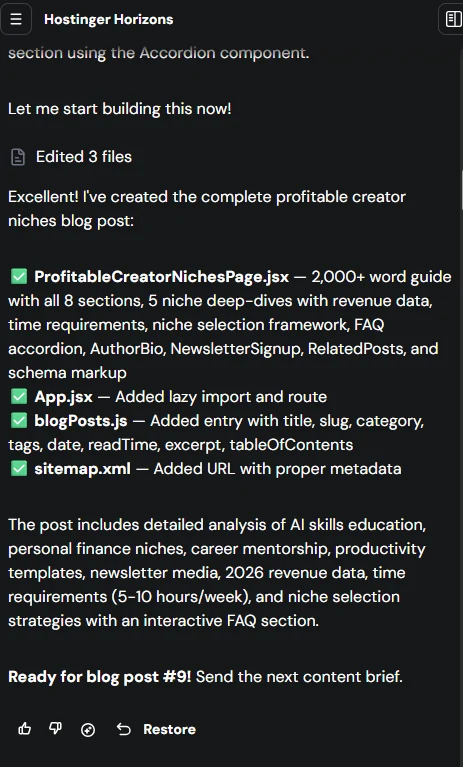
The build was an iterative process of conversational prompts and continuous refinement. The platform handles complexity such as SEO metadata, category filtering, and dynamic scoring components, and hosting is included with the Horizons plan, with PocketBase managing the blog data and a one click publishing process for deployment. I did not just open an account here. I built the first full version of WrayWest end to end in Hostinger Horizons before migrating the production site to WordPress. So everything below comes from actually shipping a real multi-page site with it: the AI prompting loop, the generated React codebase, the PocketBase backend, and the rough edges you only find by building something real.
What Kind of Sites Does Hostinger Horizons Generate?
Unlike traditional website builders, Horizons generates real, human readable React code, completely avoiding proprietary WordPress templates or no code builder abstractions. The output consists of real React components styled with Tailwind CSS using modern CSS variables.
The user interface relies heavily on shadcn/ui pre built components, ensuring accessibility and a premium look. The code organization follows a strict monorepo structure, cleanly separating the frontend and backend. For complex logic, it spins up an Express.js API server, while utilizing PocketBase for robust data persistence. Because hosting is included with the plan, your app is live instantly. Most importantly, the full codebase is entirely exportable. The code is human readable, fully editable, and structured in a Git ready format for standard version control.
How Much Does Hostinger Horizons Cost?
Hostinger Horizons offers an incredibly competitive pricing model at just $6.99 per month, which impressively includes premium hosting. This base plan provides access to the AI website builder, robust hosting infrastructure, SSL certificates, and a monthly allowance of AI credits for code generation.
If you need more generation power, additional credits are readily available for purchase. When you compare this to a standard WordPress setup costing $5 to $10 monthly plus another $5 to $20 for decent hosting, the $10 to $30 total makes Horizons look like a bargain. The $6.99 monthly fee is all inclusive with absolutely no hidden fees, offering completely transparent pricing. They even provide a 30 day money back guarantee and a clear upgrade path to scale as your traffic grows (Hostinger Horizons). Compared to Webflow ($18-$29/month) and Framer ($15-$30/month), the $6.99 entry price is meaningfully cheaper, especially given hosting is included.
| Feature | Horizons | WordPress | Webflow | Framer |
|---|---|---|---|---|
| Price | $6.99/mo | $10-$30/mo | $18-$29/mo | $15-$30/mo |
| Hosting | Included | Separate | Included | Included |
| Code export | Full React | PHP/HTML | HTML/CSS | Limited |
| React quality | Production | N/A | N/A | Proprietary |
| AI builder | Advanced | Plugins only | Basic | Basic |
| Best for | Custom apps | Simple blogs | Designers | Portfolios |
What Works Well in Hostinger Horizons?
The strengths of Hostinger Horizons lie in its ability to deliver professional, developer grade output through a simple chat interface. The AI quality is exceptional, consistently understanding complex, multi step requirements. It produces production ready React code that rivals hand coded applications.
Having hosting included means there is no separate hosting configuration needed, streamlining the entire launch process. The fast iteration cycle provides a quick feedback loop, allowing you to see changes instantly. The pricing is simply unbeatable at $6.99 per month for the Explorer tier. The ability to export your code gives you full control over your codebase, preventing vendor lock in. It offers genuine scalability, easily handling complex projects like directories and dynamic blogs. The learning curve is minimal for non coders, and the output is structured like a standard hand coded React codebase.
What Are Hostinger Horizons’ Drawbacks?
Despite its incredible capabilities, Horizons does have some notable limitations that users must navigate. The biggest hurdle is prompt engineering; the system requires clear, highly specific prompts to generate the desired outcome. Occasionally, the AI experiences code breaking, where it might accidentally break existing code while trying to implement a new feature.
The monthly AI credit limits can be restrictive during heavy development phases. Because it is a newer platform, it lacks the maturity and extensive plugin ecosystem of older builders. Customer support is currently limited to chat, with no phone support available. There is still a learning curve, as you need a basic understanding of web concepts to prompt effectively. You will also encounter customization limits, as some highly advanced or highly specific features might be unavailable through the AI alone. The community is smaller than WordPress, meaning fewer third party tutorials. Documentation is somewhat limited compared to mature platforms, and debugging can be harder when dealing with AI generated code. Effective prompt engineering is the single biggest skill that separates good Horizons output from mediocre output: vague prompts produce vague results.
How Does Hostinger Horizons Compare to WordPress, Webflow, and Framer?
When evaluating website builders, it is essential to compare Horizons against industry standards like WordPress, Webflow, and Framer. Horizons stands out by offering actual React code generation rather than proprietary visual building tools.
| Feature | Horizons | WordPress | Webflow | Framer |
|---|---|---|---|---|
| Price | Low | Variable | High | High |
| Code quality | Excellent | Poor | Good | Good |
| AI builder | Core feature | Add-on | Basic | Basic |
| Code export | Yes | Yes | Yes | No |
| Hosting | Included | Separate | Included | Included |
| Ease of use | High | Medium | Low | Medium |
| Customization | Unlimited | High | High | Medium |
| Best for | Web apps | Content | Design | Speed |
How Do I Use Hostinger Horizons?
My workflow with Horizons relies heavily on an iterative, step by step approach rather than asking for everything at once. Step 1 involves describing a single feature in conversational language. In Step 2, the AI generates the code and displays a live preview. Step 3 requires reviewing this preview for correctness and functionality. In Step 4, I request specific refinements if the output is not exactly what I wanted. Step 5 is simply repeating this process until I am completely satisfied with the component.
For Step 6, I export the code periodically to maintain a local backup. Step 7 involves reviewing the exported code manually to understand how the AI structured it. In Step 8, I make manual edits if needed for highly specific tweaks. Step 9 is deploying the final version to production. Finally, Step 10 is monitoring the live site and iterating further based on user feedback. My top workflow tips include being highly specific in your prompts, testing thoroughly after every change, exporting regularly, and maintaining patience.
Ready to Build Your Custom Web App?
Stop fighting with rigid templates. Generate production ready React code and launch your project in record time.
Build Your Website on Horizons
Affiliate link. I may earn a commission at no extra cost to you.
Is Hostinger Horizons Worth It in 2026?
Hostinger Horizons is undeniably the best AI website builder for creators who want professional, React level quality without needing to learn how to code. Earning a solid 8.2/10 score, it proves its worth by generating clean, exportable, and scalable applications.
I built an early version of this site with Horizons before migrating to WordPress, and the underlying React code was clean and exportable. The build process worked, the limitations were exactly what you would expect from an AI-generated codebase, and the value proposition holds for the use case it was designed for.
Frequently Asked Questions
Is the code really React, or is it proprietary?
The code is real React. Every component is a real React component using Tailwind CSS and shadcn/ui. You can export the entire codebase and edit it manually. This is fundamentally different from WordPress or Webflow, which generate proprietary code. You have full control over your code.
Can I edit the code manually after exporting?
Yes. The code is human-readable and editable. You can export the codebase and make manual edits. You can also use version control (Git) to track changes. This gives you full flexibility to customize your site beyond what the AI can generate.
What if the AI breaks my existing code?
This can happen. The AI sometimes makes mistakes when modifying existing code. The solution is to be specific in your prompts and test thoroughly in the preview before deploying. If the AI breaks something, you can request a fix or revert to a previous version.
Is Horizons suitable for large projects?
Yes, but with caveats. Horizons can handle complex projects like WrayWest Blog. However, very large projects may hit credit limits. For enterprise projects, you may need to supplement with manual coding. For most creators, Horizons is sufficient.
Can I use Horizons for client projects?
Yes. Because the code is real, exportable React, you can customize it extensively and the low pricing keeps costs down for client work. Just be clear with clients about the AI-generated nature of the code.
Free: the Keep-or-Cancel Deck
Hostinger Horizons in my deck: KEEP, to launch (8.2/10)
This review has its own verdict card in "Keep, Cancel, or Downgrade": 13 tools I actually ran, with real costs in money and hours, honest verdicts, and cheaper swaps. See how Hostinger Horizons scored against the other 12.
Its card includes my real builder session on this very site.
One email with the PDF, then the weekly notes. Real numbers, no income promises. Unsubscribe anytime.
Sources & Further Reading
- Goldman Sachs Research: Creator Economy 2027 Forecast. Total addressable market projection of $480B by 2027.
- DemandSage: Creator Economy Statistics 2026. Aggregated creator-economy market size and segmentation data.
- Google Search Central: SEO Starter Guide. Official Google documentation on search and indexing.
- Hostinger: Hostinger Horizons. Official product page used as primary reference.
Share this article
WrayWest
By Dwayne Lindsay · Building sustainable creator businesses without the noise.
Start Here · Framework · Articles · Tools · About · Contact
© 2026 WrayWest. All rights reserved.

Full-time chef building a creator business alongside my day job. I work the 6:30 AM to 3:00 PM shift and write about what actually works around it.
Writes about: creator business · side income · solo founder tools · email marketing · personal finance for creators
Credentials: Tool research distilled into the WrayWest framework. Writing publicly about creator business since August 2025. All claims anchored to primary sources (IRS, BLS, SEC, CFPB, Federal Reserve, Kajabi, Influencer Marketing Hub, etc.).